Change the Machine Profile
Note: Some pages and options may differ based upon how the machine or implement is configured.
-
From the auto-steer Home page, select the Tools
 button.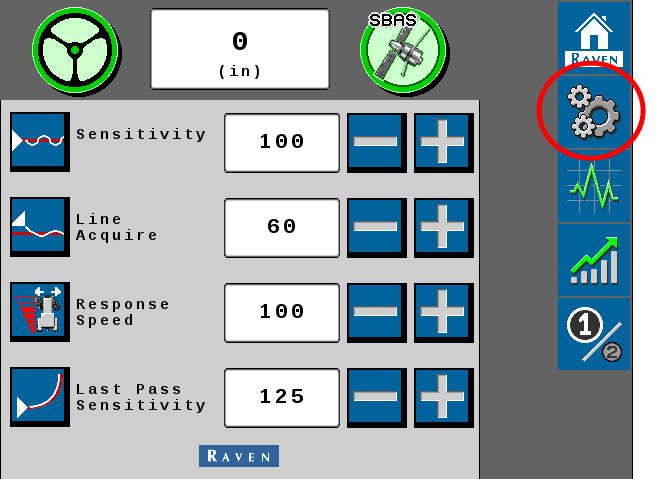
-
Select the Machine Settings
 tab.
tab.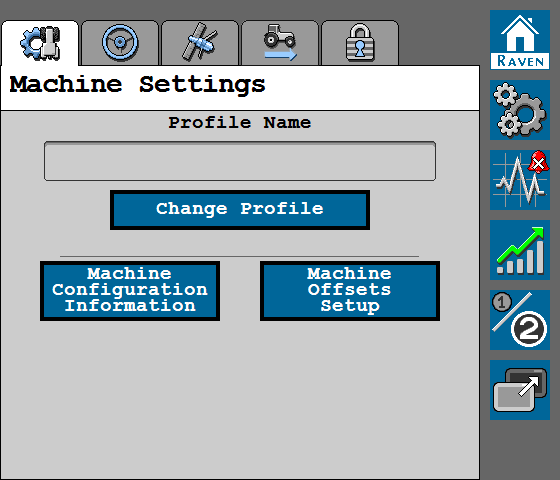
- Select the Change Profile button.
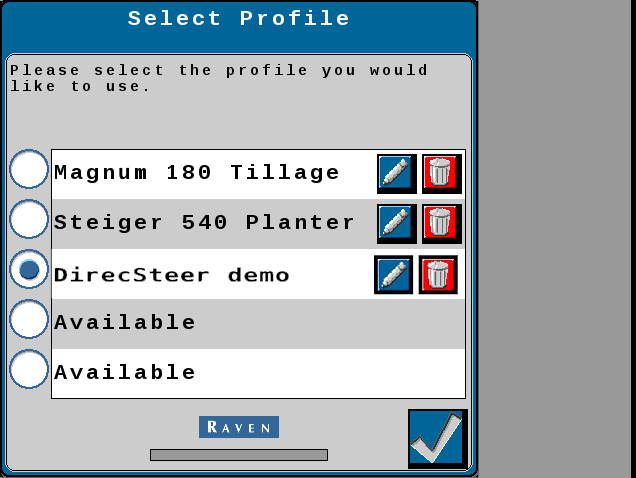
The Select Profile page allows the operator to perform the following changes to the tuneset profiles:
 To calibrate a tuneset profile
- Select a profile labeled Available.
- Select the Accept button in the lower, right corner of the page.
The tuneset calibration wizard will begin. Review the Initial Tuneset Calibration processes and follow the on-screen instructions to complete the tuneset calibration.
To select a different tuneset profile
- Touch the radio option for the desired tuneset configuration.
Note: Selecting a tuneset labeled "Available" will require the operator to complete the Initial Tuneset Configuration.
- Select the Accept button in the lower, right corner of the page to load the tuneset and return to the Machine Settings tab.
To rename a tuneset profile
- Select the Edit button.
- Use the UT A Universal Terminal (formerly Virtual Terminal) is an electronic display or console capable of interfacing with ECUs on an ISOBUS network. keyboard to enter the desired tuneset name.
- Select the Accept button in the lower, right corner of the page to load the selected tuneset and return to the Machine Settings tab.
To delete a tuneset profile
- Select the Delete button and confirm that the profile should be removed.
- To resume normal operation, either select an existing tuneset or select an "Available" tuneset and complete the tuneset calibration wizard.
Last Revised: Jul 2024