Combine Run Screen Overview
Open the Raven Cart Automation™ user interface.
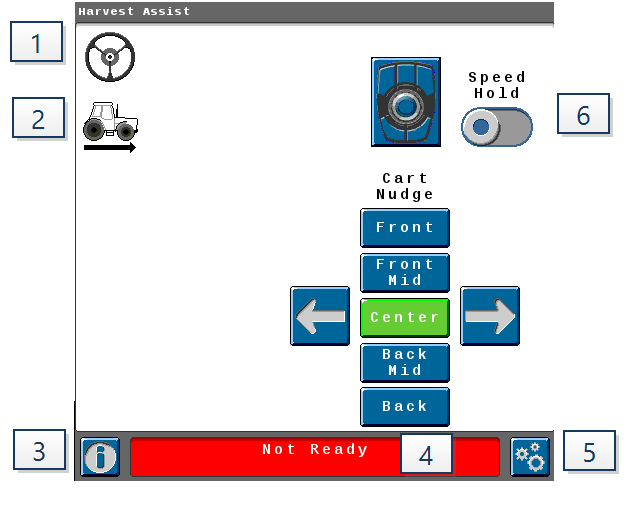
-
Steering Status
-
Blue - Engaged

-
Gray - Disengaged

-
-
Propulsion Status
-
Blue - Engaged

-
Gray - Disengaged

-
Green - Speed Hold State

-
Amber - Speed Freeze State

Note: Speed Hold is a user-initiated hold while the cart is in sync while speed freeze is the propulsion behavior for user override behaviors.
-
-
Information

-
The information button brings up a detailed list of all other machines on your radio channel and their status
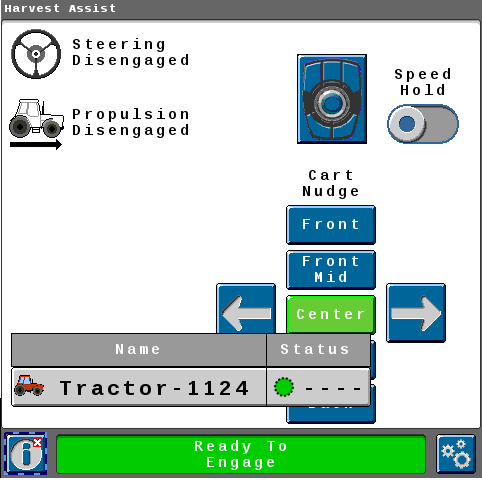
-
Press the machine name for more detailed information
Note: Machine name can be changed by clicking into the header text box.
-
Synced With - Displays the synced machine.
-
Sync Status - Displays the sync status.
-
Cart Status - If the cart has UHarvest® Pro installed, the cart status will display the weight. If UHarvest® Pro is not installed, it will display there is no grain cart scale connected.
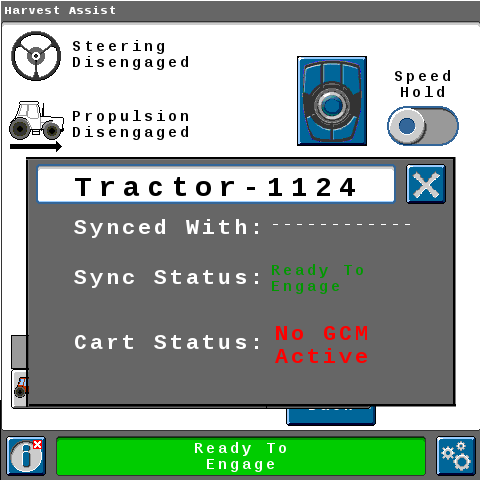
-
-
-
System Status
-
Error State - An error is preventing engagement.
-
Not Ready - System is not ready to engage.
-
Steering Not Ready (SC1™ not ready) - There is an SC1™ issue preventing engagement.
-
Ready to Engage - System is ready to engage.
-
Acquiring Sync Point - Currently driving to the sync point.
-
Synced - Synced with the combine +/- 1 meter [3.3 feet].
-
-
Tools

-
Select the Tools icon to view the sync options.
-
-
Speed Hold
-
When engaged the tractor and grain cart will maintain it's current speed regardless of the combine movement.
-
When disengaged the tractor and grain cart will return to previously selected Sync Nudge Location.
-
Last Revised: Apr 2025